| Welcome, Guest |
You have to register before you can post on our site.
|
| Forum Statistics |
» Members: 5,120
» Latest member: hbuerba
» Forum threads: 1,274
» Forum posts: 9,380
Full Statistics
|
| Online Users |
There are currently 130 online users.
» 2 Member(s) | 128 Guest(s)
hbuerba, krow146
|
| Latest Threads |
2026 XC90 T8 Ultra
Forum: Speed Limit
Last Post: stvlee99
Yesterday, 08:03 AM
» Replies: 8
» Views: 2,391
|
Does anyone know what thi...
Forum: Retrofitting
Last Post: trasgu_driver
10-11-2026, 10:52 AM
» Replies: 2
» Views: 176
|
Polestar Optimization on ...
Forum: Engine / Transmission
Last Post: sznorbi69
10-10-2026, 11:43 AM
» Replies: 8
» Views: 1,085
|
Heated Steering Wheel Con...
Forum: Retrofitting
Last Post: MooseMaster3
10-09-2026, 05:02 PM
» Replies: 4
» Views: 155
|
Infotainment Factory Rese...
Forum: Misc
Last Post: Joe558
10-09-2026, 12:52 AM
» Replies: 0
» Views: 112
|
Automatyczne drogowe xc90
Forum: Lights
Last Post: Braxia
10-08-2026, 09:13 AM
» Replies: 1
» Views: 182
|
Volvo V/S90 front seats r...
Forum: Retrofitting
Last Post: damann
10-07-2026, 01:41 PM
» Replies: 70
» Views: 43,312
|
How to clear VCM dashboar...
Forum: OrBit Q&A - Ask your questions here!
Last Post: shulercox@yahoo.com
10-06-2026, 10:09 PM
» Replies: 3
» Views: 438
|
Drive Mode and Steering P...
Forum: Misc
Last Post: Terence
10-05-2026, 11:26 PM
» Replies: 49
» Views: 69,804
|
Disable SIM/Celluar and f...
Forum: OrBit Q&A - Ask your questions here!
Last Post: jos
10-05-2026, 07:11 PM
» Replies: 8
» Views: 441
|
|
|
| Turbo adaptions reset |
|
Posted by: matuuu - 07-30-2026, 05:08 AM - Forum: OrBit Q&A - Ask your questions here!
- No Replies
|
 |
Hello,
Does Orbit have an option to reset the turbo adaptations?
I replaced the turbocharger, and the adaptation reset has not been performed yet. Is it actually necessary, and if so, where can I find this function?
|

|
|
| Shift Paddle Retrofit: Manual shifting reverts back to 'D' automatically |
|
Posted by: HugoRS10 - 07-28-2026, 12:04 AM - Forum: Retrofitting
- Replies (7)
|
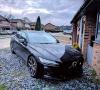 |
Hi everyone. I’ve recently retrofitted OEM shift paddles onto my 22.5 Volvo S60 Polestar Engineered. The paddles function, but when manual shifting in D or B mode, the car reverts back to automatic after a short while say maybe 3 seconds.
Is there an option or config I can change in Orbit that will command the car to remain in 'manual' shift mode without it automatically reverting back to a few seconds after shifting?
Makes the paddle shift retrofit an absolute waste of time, money and effort quite frankly otherwise.
Thanks ?
|
|
|
|
| Quite often blinker sound and audio system loss (IHU reboot) |
|
Posted by: jos - 07-25-2026, 11:51 PM - Forum: Misc
- Replies (4)
|
|
Hi,
since Volvo UX 5.0.5 and 5.1.17 i quite often have a loss of blinker and audio output which needs a IHU reboot or much worser in the night while driving reboot while everything goes dark for a while, if this just me or has anyone else similar problems? It doesn't matter of the car is on OEM or with changed config.
Best Regards JOS
|
|
|
|
| Polestar theme on Sensus (Parameter 168) |
|
Posted by: Ted68 - 07-25-2026, 06:23 PM - Forum: Audio / Visual
- Replies (3)
|
|
Hi,
I am trying to activate the blue Polestar theme on my Sensus car. I changed Parameter 168 (Screen Theme/Skins) to 05 Polestar. When I start the car, the Polestar logo appears in the driver display for a second. The theme itself doesn't change color at all, only the startup logo is visible.
I have tried searching for Trim Line and Brand parameters but couldn't find the right ones for my software version. Could anyone help me find which other parameter I need to change to lock in the blue Polestar theme?
My car is a Volvo V60 2020 D3
|
|
|
|
| Random MIL & Brake Warning Lights (ESC/ABS) after Polestar/VMax flash - V60 MY21 Mild |
|
Posted by: vec.italy - 07-24-2026, 04:28 PM - Forum: OrBit Q&A - Ask your questions here!
- Replies (3)
|
|
Hi everyone,
I'm looking for some advice on a recurring issue with a customer's car after flashing the CCF.
Vehicle: Volvo V60 MY2021 (B-Series Mild Hybrid, Sensus).
Modifications Applied: - ID 044: 250 km/h (VMax)
- ID 374: 02 (Polestar Optimization)
- ID 057: 03 (Drive Mode Digital UI on IHU - No physical scroll wheel present)
The Issue: The flash goes through perfectly and the car runs great. However, while driving, the car randomly throws the Check Engine Light (MIL) along with various brake/chassis warning lights (ESC / ABS / Parking Brake). Important note: the car does not go into Limp Mode and there is no power loss. Polestar mode works perfectly, but the dash lights up like a Christmas tree.
What I've already tried: I know that ID 057 = 03 without the physical wheel triggers the
ghost code, but that usually doesn't trigger the dashboard MIL. To fix the brake lights, I have performed the "ABS Clear Config" in the OrBit Services tab multiple times, followed by "Clear All DTCs" and a full 15-20 minute Deep Sleep (key fob far away). Unfortunately, the calibration doesn't seem to stick, and the warnings come back.
My questions for the community:
- Has anyone experienced this specific VDDM/brake module freakout on the newer B-Series / 48V architectures?
- Could the brake warnings be chained to the
mismatch code? Would reverting ID 057 to
(sacrificing the IHU button) permanently solve both the MIL and the ABS/ESC warnings?
I have already emailed support with the modified profile, but I wanted to see if anyone here has cracked this yet.
Thanks in advance!
Johnny.
|
|
|
|
| OrBit v1.3.4 release notes |
|
Posted by: Power6 - 07-23-2026, 12:48 AM - Forum: Releases
- No Replies
|
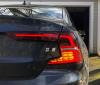 |
OrBit 1.3.4 is released! This update introduces a couple new features as well as some refinements of the back end, updates to the user interface, and normal bug fixes. We are failing at more frequent releases, so here we are in July...
(Latest version of OrBit can always be downloaded here:https://app.spaycetech.com/orbitupdate/download) The "update notification" in OrBit will be sent later, but you can download the updated install right away from the link.
New features:
Car information display - Model and other basic car information of the connected car is shown in the main tab now renamed Dashboard (formerly "Shortcuts").
Add Activate in-tank Fuel Pump - The electric fuel pump can be activated to support service, to transfer fuel inside the "saddle" type fuel tank.
New Service Procedures - **New procedures are published outside of OrBit software updates, however I call them out here as some require new version of OrBit to support them and they are not otherwise announced:
Infotainment - Active Noise Control Disable (for Android IHU)
Suspension - Position Sensor Calibration (Four-C / No Air Susp)
Engine - Reset EGR Adaptation, IEM Gen1&2 - Calibration
ADBLUE - Reset adaptations - (for all 4 equipment replacements)
Transaxle - Gear Position Sensor Calibration
ECM - Reset Adaptations - Fuel Injector X (all 4 injectors for diesl models that support)
AWD(DEM) - Oil Pressure Pump Venting
Security - Wake up Phone as Key Module (PAKM) from Transport Mode
Safety - SRS Calibrate Inertial Sensors (for Bosch SRS modules)
Updated Features:
Battery and oil level display correct for all models - Displays for HV battery State of Charge (SoC) and State of Health (SoH) were previously incorrect for some years/models as well as oil level not displayed for cars with Bosch ECM. This should now be correct for all support models.
Disconnected car handling and keep alive- OrBit now disconnects when the connected car is missing. OrBit also monitors the connection present to a car when disconnected to prevent the car from sleeping so it is available to connect without needing to wake it by re-plug the VOE adapter.
Software package download improvments- OrBit now provides error message feedback when unable to download software files needed for a package, if download fails, Internet is unreachable etc. Custom files are now supported for car specific installs, all files can be downloaded. Included is improved logging for better support help.
PIN Decoding progress- Add progress bar when running PIN decoding on Wireshark captures, so progress can be seen when parsing and cracking PINs on large Wireshark capture files.
CEM Flashing recovery- Easier recovery from failed CEM flash when the CEM is not responding, when attempting flash again OrBit recognizes the CEM is not responding and passes checks to proceed to flashing software to recover the CEM back to normal operation.
Improvements and Fixes:
FLC2 Safety Camera Calibration- Fixed multiple bugs preventing calibration of the front facing camera, corrected allowed distance measurement range etc.
Update diagnostics support for 2026.5/2027 models - Handle the update CEM security. Note we can still not support config on these secured new models.
Connection quality warning - Adjusted limits to warn less frequently about connection quality when the risk of a problem is low.
Mounted ECUs/faster profile updates- OrBit now keeps track of the ECUs (modules) that should be mounted in the car, to process profile updates faster and deal with missing modules better.
Service Procedures- Results handling is improved to reduce the instance of false positives, i.e. procedure successful but OrBit still displays an error return.
Various bug fixes and reliability improvments- The catch all, just like Volvo release notes!
|
|
|
|
| XC40 from base interior to memory seats |
|
Posted by: iGeorge3 - 07-22-2026, 03:06 PM - Forum: Retrofitting
- Replies (10)
|
 |
Good morning/afternoon, everyone!
I am looking into changing my current interior on my MY2024 XC40 Recharge.
I found a great deal and before buying them I'd like to know what would be the technical limitations.
My XC40 is an iCup, car made in 2024, and the interior would come also from a 2023 XC40, MY2024 also but it's a hybrid with Sensus.
My current interior is the base interior: only lumbar adjustment with the small knob, otherwise fully manual seats without heating, ventilation or other fancy gimmicks.
The interior I'm looking at has it all: heating, memory function, perhaps ventilated, electrically rear foldable headrests, etc.
The cabling part doesn't scare me if it is needed. Same for coding.
I am mainly wondering the following: - Are there any technical limitations that wouldn't allow for the seat to work? Physically all fits of course, but I'm wondering about the electronics part, if there is anything that wouldn't function properly
- What about coding the seat computers? Will it just be plugged in and work or will I face some difficulties, other than the obvious part that the CEM needs to be coded for the extra options?
- What about "sensus" seats going into an "iCup" car? Any limitations?
Thank you!
|
|
|
|
| XC40 CEM Repair Wire PN |
|
Posted by: Wattsy - 07-22-2026, 11:33 AM - Forum: Retrofitting
- No Replies
|
|
Hi all, I am trying to find the part number for the correct repair wire to wire in the front fogs to the CEM. I've looked everywhere. Does anyone know it?!
Thanks in advance!!!
|
|
|
|
| ADJUSTABLE SPEED LIMITER (036) |
|
Posted by: Bystrov - 07-22-2026, 10:47 AM - Forum: Speed Limit
- No Replies
|
|
Hello,
Has anyone had success enabling **036. ADJUSTABLE SPEED LIMITER** on a 2024+ C40 / EC40 / XC40?
Most of the threads I can find are SPA/Sensus-era. I'd like to know whether this still works on the current CMA cars with the Android HMI, and if so:
- Did you set `ASL` or `ASL & AVSL`?
- Did you need to touch **149. ROAD SIGN INFORMATION** as well?
- Where does the function show up in the UI on the new HMI?
My car is a 2024 EC40 (V317). Thanks!!
|
|
|
|
|